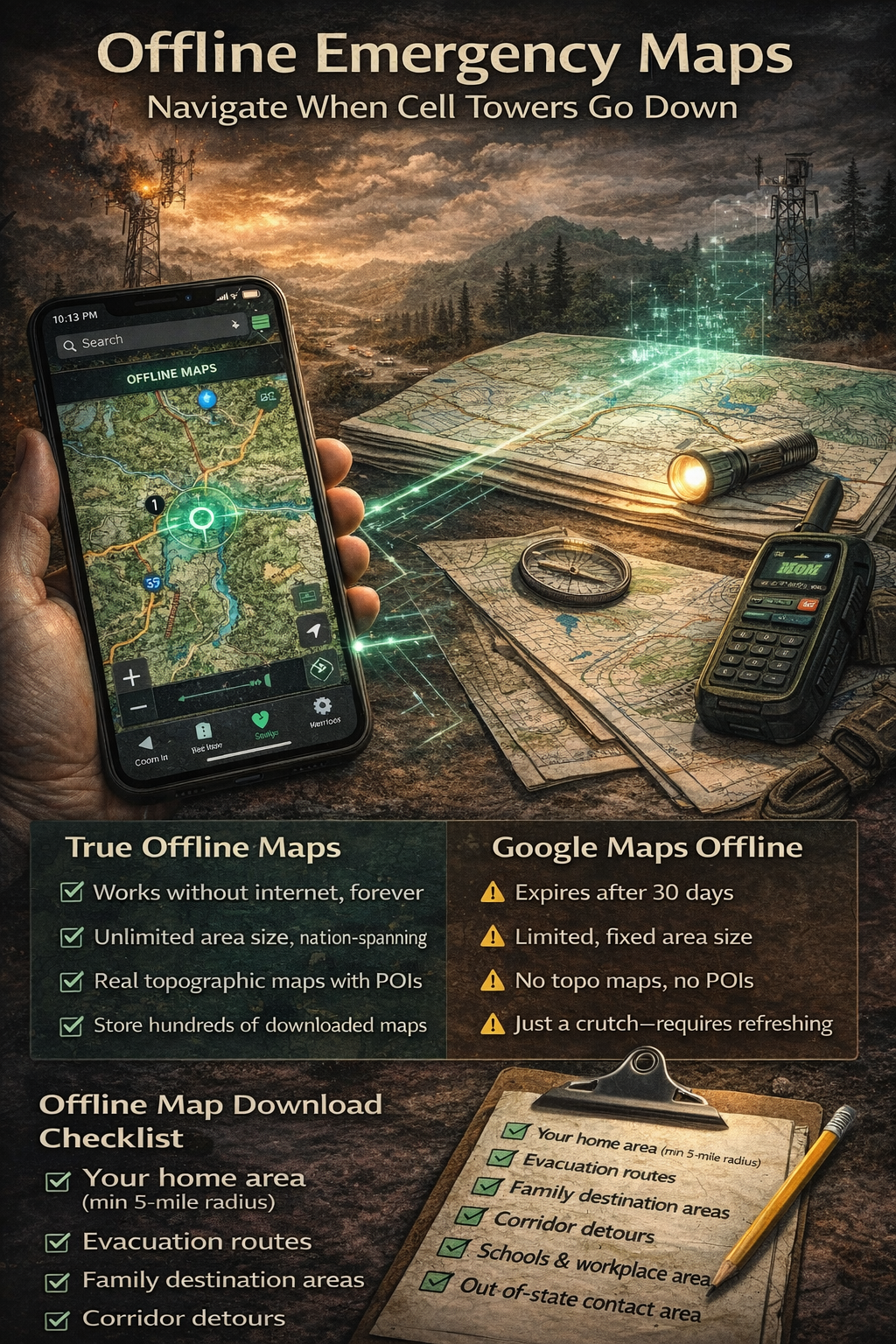
During the 2018 Camp Fire in Paradise, California, residents fleeing for their lives discovered something terrifying: Google Maps didn't work. Cell towers had burned. Data connections were gone. The app that they relied on for every drive to the grocery store showed a blank screen during the most critical drive of their lives. Some made wrong turns into the fire. Others sat in gridlock on routes they didn't know had alternatives. The people who made it out fastest were the ones who knew the roads — or had maps that didn't need a cell tower.
That gap between "I have a phone with maps" and "I have maps that actually work in an emergency" is the difference this guide is designed to close.
Why Your Phone's Maps Won't Work In a Disaster
We think of cell service as infrastructure — always there, like electricity or running water. But cell towers are physical objects in the real world, and disasters destroy physical objects. Fire burns them. Wind knocks them over. Flooding shorts out their electronics. Ice accumulates on antennas and snaps them. And when the power grid goes down, towers run on battery backup — typically about 8 hours. After that, darkness. No signal. No data. No maps.
Even when towers survive, they get overwhelmed. During a disaster, everyone in the affected area is calling, texting, and trying to load information at the same time. Cell networks aren't built for 100% simultaneous usage. They're built for average load. When a hurricane or wildfire pushes everyone onto the network at once, it saturates. Calls won't connect. Data crawls or stops entirely. Your map app shows a spinning wheel while the fire gets closer.
Here's the part most people don't understand: GPS and data are two different things. The GPS chip in your phone receives signals directly from satellites — it doesn't need a cell tower. So your phone can still determine your exact position. But the map tiles — the actual images of roads, buildings, and terrain that make GPS useful — are downloaded from the internet in real time. No data connection means GPS knows where you are, but you're staring at a blank gray screen with a blue dot on it.
That's why offline maps aren't a nice-to-have. They're the difference between navigation and guessing.
Google Maps Offline vs. True Offline Maps
Google Maps does have an offline mode, and it's better than nothing. But it has significant limitations for emergency use:
- You must download areas in advance — you can't do it after the disaster starts and connectivity is gone
- Downloaded areas expire after 30 days if your phone doesn't connect to the internet to refresh them
- Limited area size — each download covers a fixed region, and you can only download so many before storage fills up
- No traffic data (obviously, since that requires live data) and some features like transit directions are missing
- Easy to forget — there's no reminder system to keep offline maps current
Apple Maps added offline support in iOS 17, with similar limitations. Both are designed for convenience — downloading a city before an international trip — not for life-safety navigation during a disaster.
Dedicated offline map apps like OsmAnd and Maps.me use OpenStreetMap data and store maps permanently without expiration. They're better for pure offline navigation, but they're single-purpose tools — they don't connect to your emergency plan, your family's rally points, or your evacuation routes.
The ideal approach integrates offline maps with your emergency planning: maps that are stored permanently on your device, marked with the locations that matter to your family, and accessible in the same place as your evacuation routes and emergency contacts.
NomadCore tip: Download maps directly in NomadCore — they're stored on your device permanently, with no 30-day expiration. Your maps stay ready whether you last connected to the internet yesterday or three months ago.
What to Download — The Coverage Strategy
Most people who download offline maps grab their immediate neighborhood and call it done. That's not enough. In a disaster, you're not navigating to the corner store — you're navigating to safety, which might be 50 or 200 miles away. You need map coverage for the entire journey, including detours.
The offline map download checklist
- Your home area — 5-mile radius minimum, covering all nearby roads and intersections
- All 3 evacuation routes, end to end — not just the starting point, but every mile of each route to its destination
- Your destination areas — the family member's house, shelter locations, hotels along your evacuation corridor
- The corridors between locations — you might need to detour around road closures, accidents, or hazard zones
- Your workplace and kids' school areas — a disaster might start while your family is scattered across town
- Your out-of-state contact's area — if you're evacuating long-distance, you need maps for the arrival zone too
Think of it in layers: home, routes, destinations, and the spaces between them. If you can trace a finger from your house to every possible destination and your map data covers every inch of that path — including 10 miles on either side for detours — you're covered.
Marking Your Maps for Emergencies
Downloading map data is step one. Marking it up is what makes maps useful under stress. When adrenaline is pumping and smoke is on the horizon, you won't remember addresses or think clearly about alternate routes. Your map needs to already have that information pinned, labeled, and color-coded.
Essential map markings
- Pin your 3 evacuation routes in different colors so you can distinguish them at a glance
- Mark rally points — your family's designated meeting locations if you're separated when disaster strikes
- Mark known shelter locations — Red Cross shelters, community centers, churches that open during emergencies
- Mark gas stations along evacuation routes — fuel is critical during evacuation and stations run dry fast
- Mark hospitals and urgent care facilities along each route in case of injuries during evacuation
- Mark hazard zones — flood plains, areas prone to landslides, low bridges that flood, roads through dense forest
- Pin cached supply locations if you have pre-positioned supplies along your routes
The goal is to make your map a complete situational awareness tool — not just "where am I?" but "where should I go, what's along the way, and what should I avoid?"
NomadCore tip: Pin evacuation routes, rally points, and shelter locations right on the map — visible even without internet. Your marked locations are integrated with your emergency plan, so you see routes and meeting points in context rather than on a separate app.
Using Maps Without Data — Practical Tips
Once you have offline maps downloaded and marked, you need to know how to actually use them when connectivity is gone. Here are the practical details that matter:
GPS works without cell service. Your phone's GPS chip communicates directly with satellites — it doesn't route through cell towers. So your position dot on downloaded maps is accurate even with zero bars of service. This is the foundation of offline navigation.
But GPS drains battery fast. Continuous GPS usage can drain a phone battery in 4-6 hours. During a disaster, your phone is your communication lifeline — you can't afford to kill it tracking your location nonstop. Use GPS in bursts: turn on location services, confirm your position and heading, then turn it off until the next check. Every 10-15 minutes is sufficient if you're on a known route.
Battery and backup checklist
- Keep a portable battery pack charged and in your go-bag (minimum 10,000 mAh)
- Carry a car charger that works with your phone
- Put your phone in low-power mode before evacuating
- Close all unnecessary apps — background activity drains battery even without data
- Reduce screen brightness to the minimum you can read in your current conditions
The paper backup
Print backup paper maps of your evacuation routes. Yes, paper. It sounds archaic, but paper doesn't run out of battery, doesn't crack when dropped, and works in rain inside a zip-lock bag. Print your top three routes with key landmarks highlighted. Keep one copy in your go-bag and one in each family vehicle.
Family map literacy
Teach every family member old enough to read basic map skills: which way is north, how to read a scale (one inch equals how many miles), what common map symbols mean, and how to identify your location using road intersections and landmarks. If your phone dies and you're down to paper, these skills become critical. Make it a family activity — drive one of your evacuation routes and have the kids navigate using only the printed map.
NomadCore tip: GPS positioning works without cell service — your location dot is accurate on downloaded maps even with no data connection. NomadCore shows your position on your pre-marked evacuation routes so you always know where you are relative to your plan.
Practice run
At least once a year, navigate one of your evacuation routes with your phone in airplane mode. Use only your downloaded offline maps. You'll quickly discover gaps: map areas you forgot to download, routes that aren't fully covered, pins that are in the wrong place, or intersections where the map data doesn't match the real road. Better to discover these gaps on a Saturday afternoon than during an actual evacuation.
Seasonal Map Maintenance
Offline maps are not a set-and-forget tool. Roads change. New construction reroutes traffic. Shelters move. Gas stations close. If your maps are stale, they'll mislead you when you need them most.
Quarterly map maintenance checklist
- Re-download all saved map areas to get the latest road data
- Verify that Google Maps / Apple Maps offline areas haven't expired
- Check that pinned shelter locations are still active — call your local Red Cross chapter or check their website
- Update gas station pins if any have closed or new ones have opened along your routes
- Review marked hazard zones — new construction may have changed flood patterns or created new risk areas
- Delete old map data for areas you no longer need, to free up storage space
- Check that your paper backup maps are still legible and the routes haven't changed
Seasonal triggers
Beyond the quarterly schedule, refresh your maps before specific risk seasons:
- Before fire season (typically May-June in the western U.S.) — update all evacuation routes and ensure wildfire-prone corridors are covered
- Before hurricane season (June 1) — download coastal evacuation routes and inland shelter areas
- Before winter storm season (October-November) — ensure alternate routes are mapped in case primary roads are impassable due to ice or snow
- After any major road construction in your area — new interchanges, road closures, or rerouted highways
NomadCore tip: Maps stored in NomadCore are integrated with your emergency plan — see your routes and meeting points in context. When you update your plan seasonally, your map markings update with it. No separate app to remember, no separate maintenance schedule to manage.
The 60-Second Version
If you take away only five things from this article:
- Download offline maps now, before you need them. Cover your home, all evacuation routes end-to-end, and all destination areas. Don't wait until the emergency alert hits your phone.
- Mark your maps with evacuation routes, rally points, shelters, and gas stations. A blank map is just geography. A marked map is a plan.
- GPS works without cell service — your position dot is still accurate on downloaded maps. But use it in bursts to save battery.
- Print paper backup maps of your top three evacuation routes. Paper doesn't need charging.
- Maintain your maps quarterly and before each risk season. Stale data is dangerous data.
The people who navigate disasters successfully aren't lucky — they're prepared. And preparation, in this case, takes less than an hour. Download the maps. Mark the routes. Print the backups. Practice once. That's it. When the cell towers go dark and everyone else is staring at a blank screen, you'll be the one who knows exactly where to go.
Download NomadCore to build your emergency plan with offline maps, evacuation route marking, encrypted document storage, and family sharing — all accessible when cell towers and internet go down.